

🧠 Introduction
In the world of Artificial Intelligence (AI) and Machine Learning (ML), one programming language consistently stands out—Python. Whether it’s building recommendation systems, training deep learning models, or analyzing massive datasets, Python has become the backbone of modern AI development.
But what exactly is Python, and why has it become the top choice for developers, data scientists, and AI engineers?
Let’s break it down in a simple, practical way.
🐍 What is Python?
Python is a high-level, interpreted programming language known for its simplicity and readability. Created by Guido van Rossum and released in 1991, Python was designed with one clear goal: make coding easy to understand and write.
Unlike complex languages that require heavy syntax, Python uses clean and minimal code structures that resemble human language. This makes it beginner-friendly while still being powerful enough for advanced applications like AI and ML.
Key Characteristics of Python:
- Easy-to-read syntax
- Platform-independent (runs on Windows, Mac, Linux)
- Large standard library
- Open-source and free
- Strong community support
Because of these features, Python is widely used in:
- Web development
- Data science
- Automation
- Artificial Intelligence & Machine Learning
🤖 Why Python is Popular in AI and Machine Learning

Python’s dominance in AI/ML is not accidental—it’s the result of multiple strong advantages working together.
1. Simple and Readable Syntax
AI and ML involve complex mathematical models and algorithms. Python reduces that complexity with its clean syntax.
For example, tasks that require dozens of lines in other languages can often be done in just a few lines in Python. This allows developers to focus more on logic and problem-solving, rather than worrying about syntax errors.
2. Powerful Libraries and Frameworks
One of Python’s biggest strengths is its rich ecosystem of libraries specifically designed for AI and ML.
Some of the most widely used include:
- NumPy – for numerical computations
- Pandas – for data analysis
- Matplotlib / Seaborn – for data visualization
- Scikit-learn – for machine learning models
- TensorFlow and Keras – for deep learning
- PyTorch – for advanced neural networks
These libraries save time and effort by providing pre-built functions and tools.
3. Strong Community Support
Python has one of the largest developer communities in the world. This means:
- Tons of tutorials and documentation
- Quick solutions to problems
- Continuous updates and improvements
If you’re stuck while building an AI model, chances are someone has already solved that problem online.
4. Versatility and Flexibility
Python is not limited to just AI. It integrates easily with:
- Web applications
- Databases
- Cloud platforms
- Big data tools
This makes it ideal for building end-to-end AI systems, from data collection to deployment.
5. Integration with AI Technologies
Python supports integration with cutting-edge technologies such as:
- Natural Language Processing (NLP)
- Computer Vision
- Robotics
- Automation tools
Frameworks like TensorFlow and PyTorch are primarily built for Python, making it the default choice for AI innovation.
6. Faster Development Cycle
In AI/ML projects, experimentation is key. Python allows:
- Quick prototyping
- Easy testing
- Faster iteration
This significantly reduces development time compared to other programming languages.
📊 Graph: Python’s Popularity in AI/ML
y=20+15xy = 20 + 15xy=20+15x
Explanation:
This simple graph represents the rapid growth of Python usage in AI/ML over time. As time (x) increases, adoption (y) rises steadily, reflecting how Python has become the dominant language in the AI ecosystem.
🚀 Real-World Applications of Python in AI/ML
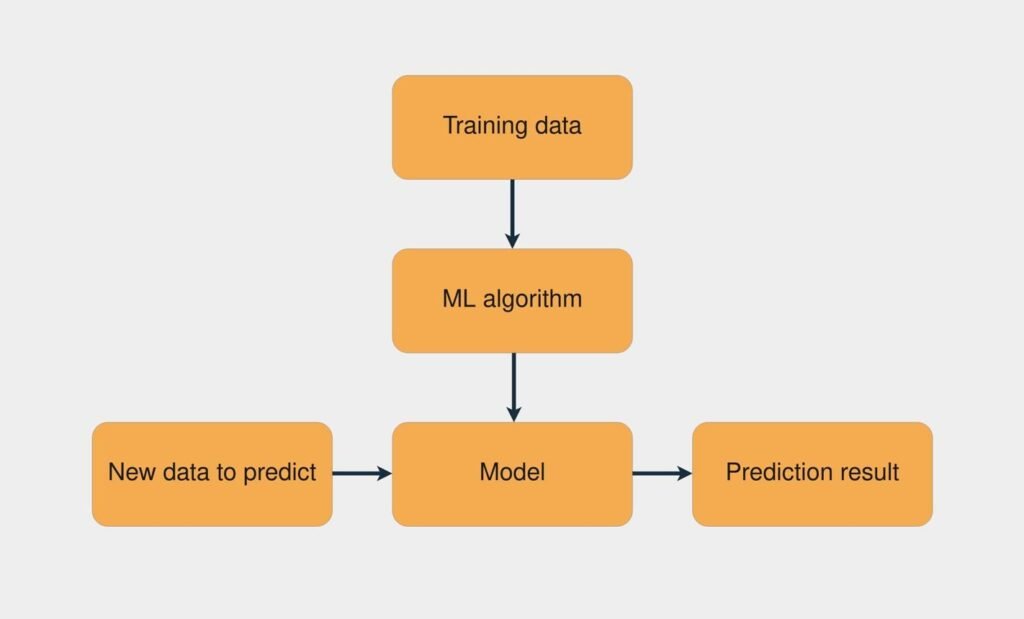
Python is used in many real-world AI applications, including:
🧠 Introduction
- Recommendation Systems (Netflix, Amazon)
- Voice Assistants (Siri, Alexa)
- Chatbots and Virtual Assistants
- Image Recognition Systems
- Fraud Detection in Banking
- Self-driving Car Technology
These applications highlight Python’s ability to handle complex AI tasks efficiently.
💡 Why Beginners Prefer Python for AI
For someone starting in AI/ML, Python offers:
- Low learning curve
- Easy debugging
- Huge learning resources
- Immediate practical results
Instead of spending months learning syntax, beginners can start building AI models within weeks.
Setting Up Python Environment (Anaconda & Jupyter Notebook)
🧠 Introduction
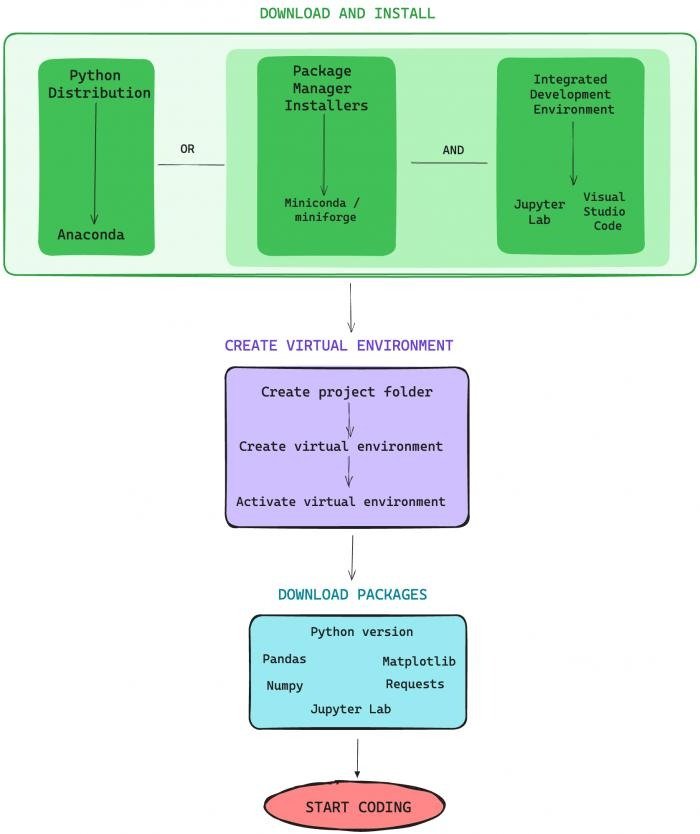
Before you can start building AI or Machine Learning models, the very first step is setting up a proper Python environment. A well-configured environment ensures that your tools, libraries, and dependencies work smoothly without conflicts.
Two of the most popular tools for this are Anaconda and Jupyter Notebook. Together, they provide a powerful, beginner-friendly setup for coding, data analysis, and AI development.
Let’s understand how they work and how to set them up step by step.
🐍 What is Anaconda?
Anaconda is a Python distribution specifically designed for data science, AI, and machine learning. Instead of installing Python and libraries one by one, Anaconda provides everything in a single package.
Key Features of Anaconda:
- Comes with Python pre-installed
- Includes 1000+ data science libraries
- Built-in environment management
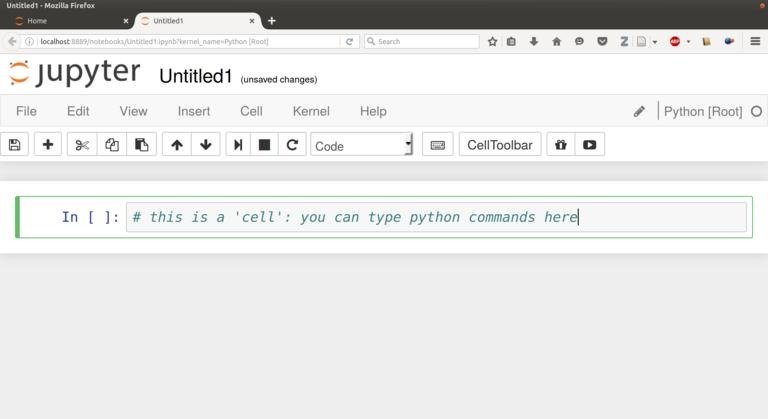
- Easy-to-use graphical interface (Anaconda Navigator)
- Supports both beginners and professionals
With Anaconda, you don’t have to worry about manually installing libraries like NumPy, Pandas, or TensorFlow—they are either pre-installed or easily accessible.
📒 What is Jupyter Notebook?
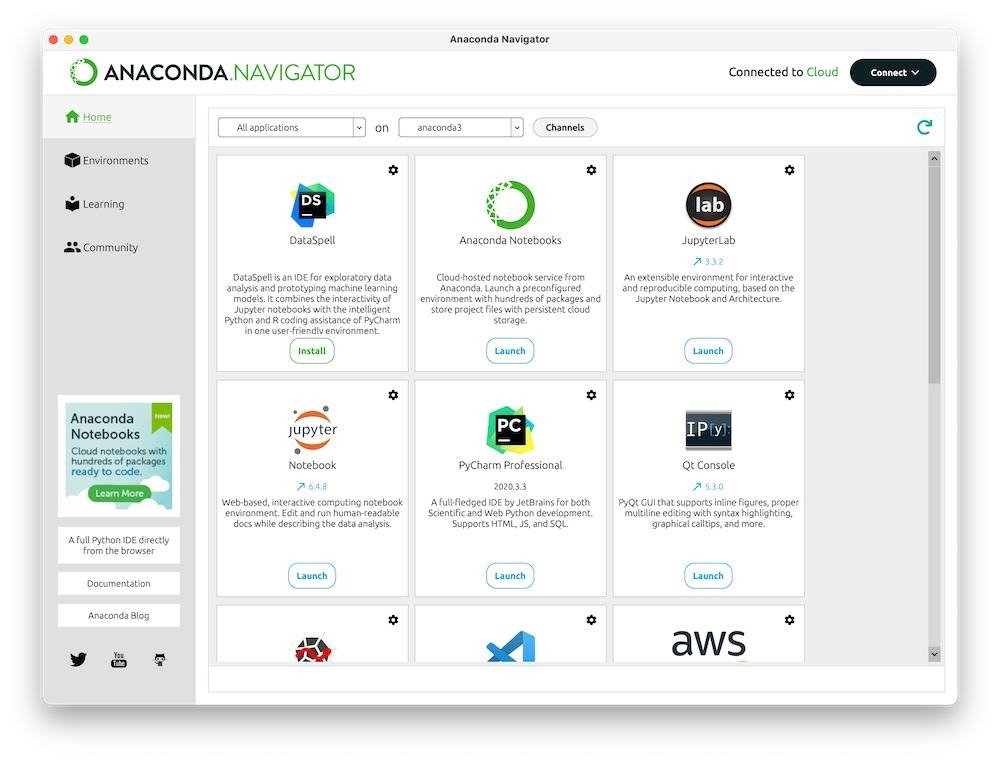
Jupyter Notebook is an interactive coding environment that runs in your browser. It allows you to write and execute Python code in small sections called “cells.”
Why Jupyter is Popular:
- Run code step-by-step
- Combine code, text, and visuals in one place
- Ideal for data analysis and ML experiments
- Easy debugging and visualization
It’s widely used by data scientists because it makes experimentation and explanation simple.
⚙️ Step-by-Step: Installing Anaconda
1. Download Anaconda
- Visit the official website: https://www.anaconda.com
- Choose your operating system (Windows, Mac, Linux)
- Download the latest version
2. Run the Installer
- Open the downloaded file
- Follow the installation instructions
- Keep default settings (recommended for beginners)
3. Verify Installation
- Open Anaconda Navigator
- If it launches successfully, installation is complete
🧪 Creating a Python Environment
One of the most powerful features of Anaconda is environment management.
An environment is like a separate workspace where you can install specific versions of Python and libraries without affecting other projects.
Steps to Create an Environment:
- Open Anaconda Navigator
- Go to “Environments” tab
- Click “Create”
- Name your environment (e.g., ai_project)
- Select Python version
- Click “Create”
Now you have a clean workspace ready for your project.
📓 Launching Jupyter Notebook
Once Anaconda is installed, launching Jupyter is very simple:
Method 1: Using Anaconda Navigator
- Open Navigator
- Click “Launch” under Jupyter Notebook
Method 2: Using Command Prompt
jupyter notebook
This will open Jupyter in your browser.
✍️ Understanding Jupyter Interface
Jupyter Notebook has a simple interface:
- Cells: Where you write code or text
- Kernel: Executes your code
- Toolbar: Run, stop, restart options
Types of Cells:
- Code cell → runs Python code
- Markdown cell → used for writing text, headings, notes
This combination makes Jupyter perfect for learning and documenting your work.
📦 Installing Libraries in Anaconda
Even though Anaconda comes with many libraries, you may need additional ones.
Using Anaconda Navigator:
- Go to “Environments”
- Search for a library
- Click “Install”
Using Command Line:
conda install numpy
pip install pandas
📊 Graph: Environment Setup Efficiency
y=−2x+10y = -2x + 10y=−2x+10
Explanation:
This graph represents how setup complexity decreases as you use better tools like Anaconda. Traditional setup (higher x) involves more complexity (higher y), while Anaconda simplifies the process significantly.
🚀 Why Use Anaconda + Jupyter for AI/ML?
1. All-in-One Solution
No need to install multiple tools separately.
2. Easy Environment Management
Avoids version conflicts between projects.
3. Beginner-Friendly
Simple UI and guided setup process.
4. Perfect for Experimentation
Jupyter allows quick testing and visualization.
5. Industry Standard
Widely used by data scientists and AI engineers.
⚠️ Common Mistakes to Avoid
- Installing Python separately alongside Anaconda (can cause conflicts)
- Not using virtual environments
- Mixing pip and conda carelessly
- Forgetting to activate environment before installing libraries
💡 Pro Tips
- Always create a new environment for each project
- Keep your environments lightweight
- Use Jupyter for learning, but switch to IDEs for production
- Regularly update Anaconda
Python Syntax Basics for Beginners
🧠 Introduction
If you’re starting your journey in programming—especially in AI and Machine Learning—learning Python syntax is your first real step. Syntax simply means the rules that define how code is written and understood by the computer.
The good news? Python is known for having one of the simplest and cleanest syntaxes among all programming languages. Unlike complex languages filled with symbols and brackets, Python reads almost like plain English.
In this guide, you’ll understand the core building blocks of Python syntax in a beginner-friendly way.
🐍 What is Python Syntax?
Python syntax refers to the set of rules used to write Python programs. These rules control how you:
- Write statements
- Define variables
- Use loops and conditions
- Structure your code
One of Python’s core philosophies is readability, introduced by its creator Guido van Rossum—which is why Python code looks clean and organized.
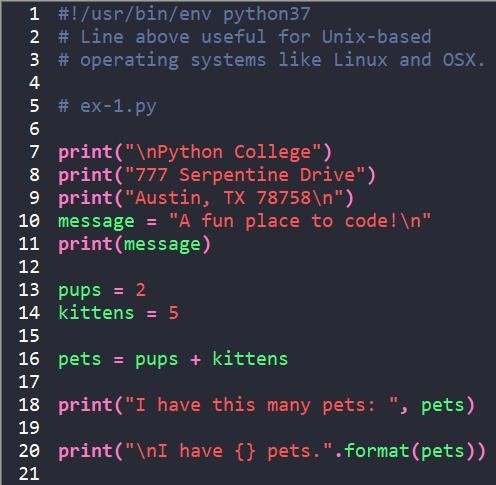
✍️ 1. Writing Your First Python Program
Let’s start with the most basic example:
print(“Hello, World!”)
This single line tells Python to display text on the screen.
👉 Notice:
- No semicolons (;)
- No complex structure
- Easy to understand
That’s the beauty of Python.
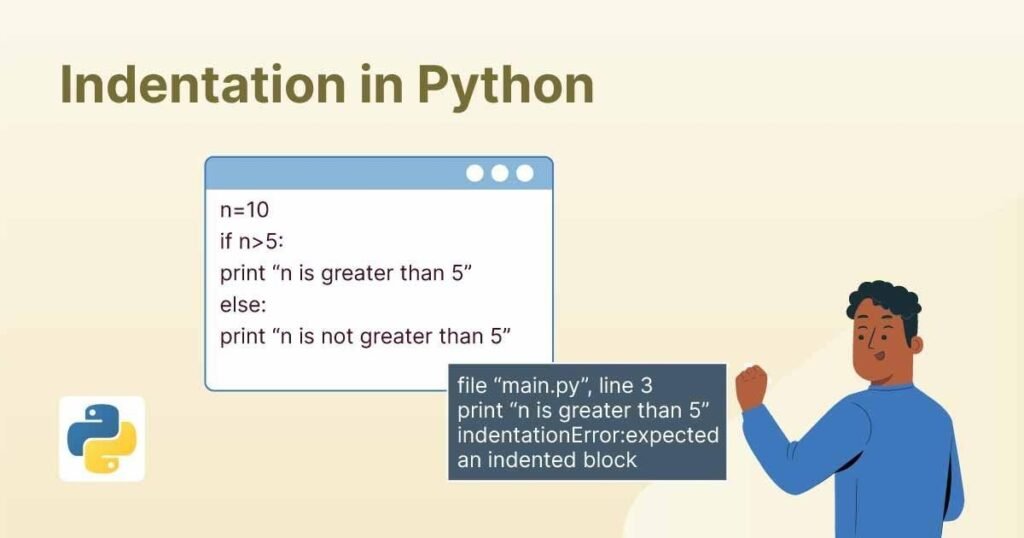
📏 2. Importance of Indentation
Unlike many programming languages, Python uses indentation (spaces) to define blocks of code.
Example:
if 5 > 2:
print(“Five is greater than two”)
If you remove the space before print, Python will throw an error.
👉 Indentation replaces curly braces {} used in other languages.
🔤 3. Variables and Data Types
Variables are used to store data.
name = “John”
age = 25
price = 99.99
Common Data Types:
- String → “Hello”
- Integer → 10
- Float → 3.14
- Boolean → True / False
Python automatically detects the data type—no need to declare it manually.
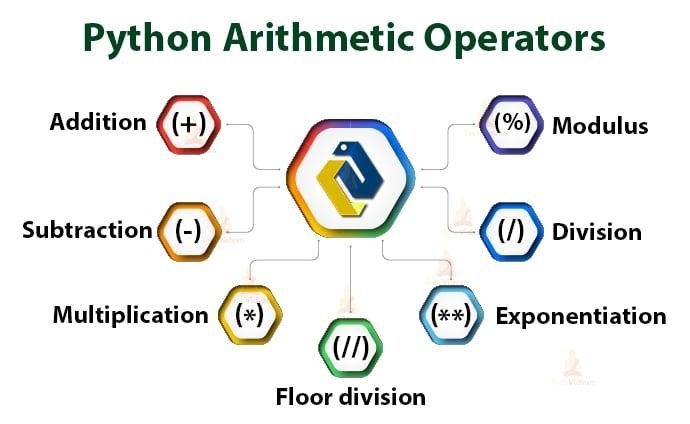
➕ 4. Operators in Python
Operators perform operations on variables.
Examples:
a = 10
b = 5
print(a + b) # Addition
print(a – b) # Subtraction
print(a * b) # Multiplication
print(a / b) # Division
Python also supports comparison and logical operators:
print(a > b) # True
print(a == b) # False
🔁 5. Conditional Statements
Conditions help your program make decisions.
age = 18
if age >= 18:
print(“You can vote”)
else:
print(“You cannot vote”)
You can also use elif for multiple conditions.
🔄 6. Loops in Python
Loops are used to repeat actions.
For Loop:
for i in range(5):
print(i)
While Loop:
i = 0
while i < 5:
print(i)
i += 1
🧩 7. Functions in Python
Functions help you reuse code.
def greet(name):
print(“Hello ” + name)
greet(“John”)
👉 Functions make your code organized and efficient.
📝 8. Comments in Python
Comments are used to explain code.
# This is a comment
print(“Hello”)
Python ignores comments during execution.
📦 9. Lists and Basic Data Structures
Python provides built-in data structures.
List Example:
fruits = [“apple”, “banana”, “mango”]
print(fruits[0])
Lists are ordered and changeable.
⚠️ Common Syntax Mistakes
Beginners often make these errors:
- Missing indentation
- Wrong spelling of keywords
- Forgetting quotes in strings
- Mixing tabs and spaces
Fixing these early helps you write better code.
📊 Graph: Learning Curve of Python Syntax
y=−x+10y = -x + 10y=−x+10
Explanation:
This graph shows that as your practice (x) increases, the difficulty (y) of understanding Python syntax decreases. Python is beginner-friendly, so the learning curve becomes easier over time.
🚀 Why Python Syntax is Beginner-Friendly
1. Clean and Simple
Python avoids unnecessary symbols and complexity.
2. Readable Code
Code looks like plain English.
3. Less Code, More Work
You can achieve more with fewer lines.
4. Easy Debugging
Errors are easier to identify and fix.
💡 Pro Tips for Beginners
- Practice daily with small programs
- Focus on understanding logic, not just syntax
- Use Jupyter Notebook for experiments
- Read error messages carefully
Understanding Variables, Data Types, and Operators in Python
Every Python program—whether it’s a simple calculator or a complex AI model—relies on three fundamental building blocks: variables, data types, and operators. These elements allow you to store information, define what kind of data you’re working with, and perform operations on that data.
If you truly understand these basics, you build a strong foundation for everything in programming, especially in data science, AI, and machine learning.
📦 What are Variables?
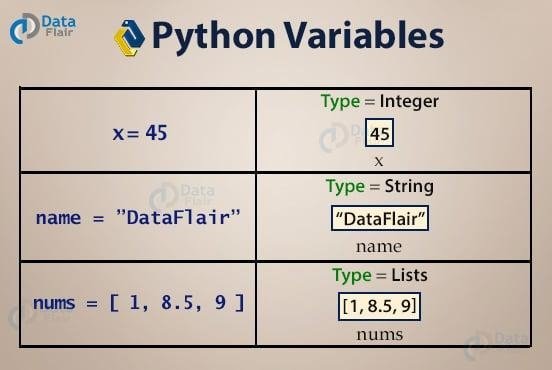
A variable is like a container used to store data. Instead of repeatedly writing values, you assign them to variables and reuse them.
Example:
x = 10
name = “Alice”
price = 99.99
Here:
- x stores an integer
- name stores a string
- price stores a decimal number
👉 Python does not require you to declare the type of a variable. It automatically understands it.
🧾 Rules for Naming Variables
- Must start with a letter or underscore _
- Cannot start with a number
- Cannot use reserved keywords (if, for, while)
- Should be meaningful (age, total_price)
Good Example:
user_age = 25
Bad Example:
a = 25
Meaningful names make your code easier to understand.
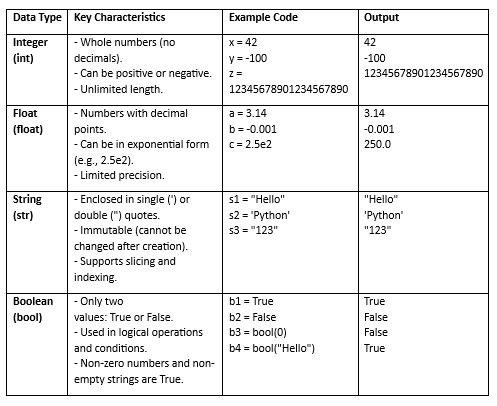
🔤 Understanding Data Types
A data type defines the kind of value a variable holds.
1. String (str)
Used for text.
name = “Python”
2. Integer (int)
Whole numbers.
age = 21
3. Float (float)
Decimal numbers.
price = 99.99
4. Boolean (bool)
True or False values.
is_active = True
🧩 Checking Data Types
You can check the type of a variable using:
print(type(age))
Output:
<class ‘int’>
🔄 Type Conversion
Sometimes you need to convert one data type to another.
x = “10”
y = int(x)
Now y becomes an integer.
Common Conversions:
- int()
- float()
- str()
➕ What are Operators?
Operators are symbols used to perform operations on variables and values.
🧮 1. Arithmetic Operators
Used for basic calculations.
a = 10
b = 5
print(a + b) # Addition
print(a – b) # Subtraction
print(a * b) # Multiplication
print(a / b) # Division
print(a % b) # Modulus
⚖️ 2. Comparison Operators
Used to compare values.
print(a == b) # Equal
print(a != b) # Not equal
print(a > b) # Greater than
print(a < b) # Less than
These return True or False.
🔗 3. Logical Operators
Used to combine conditions.
x = True
y = False
print(x and y) # False
print(x or y) # True
print(not x) # False
🧾 4. Assignment Operators
Used to assign values.
x = 10
x += 5 # x = x + 5
🔍 Real Example Combining Everything
name = “John”
age = 20
if age >= 18:
print(name + ” is eligible to vote”)
👉 This example uses:
- Variables (name, age)
- Data types (string, integer)
- Operator (>=)
⚠️ Common Mistakes Beginners Make
- Confusing = (assignment) with == (comparison)
- Mixing data types incorrectly
print(“Age: ” + 20) # Error - Not converting data types when needed
Correct way:
print(“Age: ” + str(20))
📊 Graph: Understanding Efficiency Growth
y=2x+1y = 2x + 1y=2x+1
Explanation:
This graph represents how your coding efficiency (y) increases as your understanding (x) of variables, data types, and operators improves. These basics directly impact your ability to write better programs.
🚀 Why These Concepts Matter in AI/ML
In AI and Machine Learning:
- Variables store datasets and model parameters
- Data types define the structure of data
- Operators perform calculations and logic
Without mastering these, you cannot:
- Process data
- Train models
- Build algorithms
💡 Pro Tips for Beginners
- Practice small programs daily
- Experiment with different data types
- Try combining operators in conditions
- Read error messages carefully
Control Structures (if-else, loops) in Python
🧠 Introduction
In programming, writing code is not just about executing instructions—it’s about making decisions and repeating actions efficiently. This is where control structures come into play.
Control structures in Python allow your program to:
- Make decisions using conditions
- Repeat tasks using loops
- Control the flow of execution
For beginners, mastering if-else statements and loops is a major step toward writing real, functional programs—especially in fields like AI and Machine Learning where logic and iteration are everywhere.
🔀 What are Control Structures?
Control structures determine the order in which code executes. Instead of running line-by-line blindly, your program can:
- Choose different paths
- Repeat actions
- Stop or skip steps
In Python, the main control structures are:
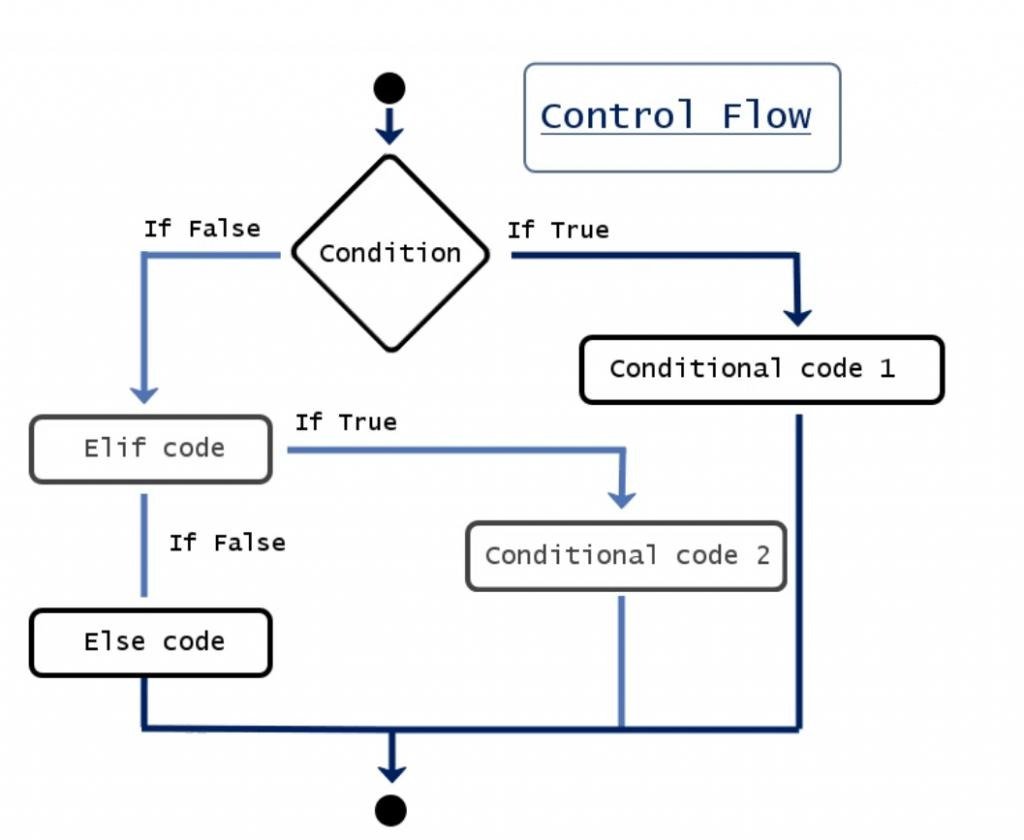
- Conditional statements (if, else, elif)
- Loops (for, while)
⚖️ Conditional Statements (if-else)
Conditional statements help your program make decisions based on conditions.
🔹 Basic if Statement
age = 18
if age >= 18:
print(“You are eligible to vote”)
👉 If the condition is true, the code runs. If false, it skips.
🔹 if-else Statement
age = 16
if age >= 18:
print(“Eligible”)
else:
print(“Not eligible”)
👉 This gives two possible outcomes.
🔹 if-elif-else Statement
marks = 75
if marks >= 90:
print(“A Grade”)
elif marks >= 60:
print(“B Grade”)
else:
print(“C Grade”)
👉 Used when you have multiple conditions.
📏 Importance of Indentation
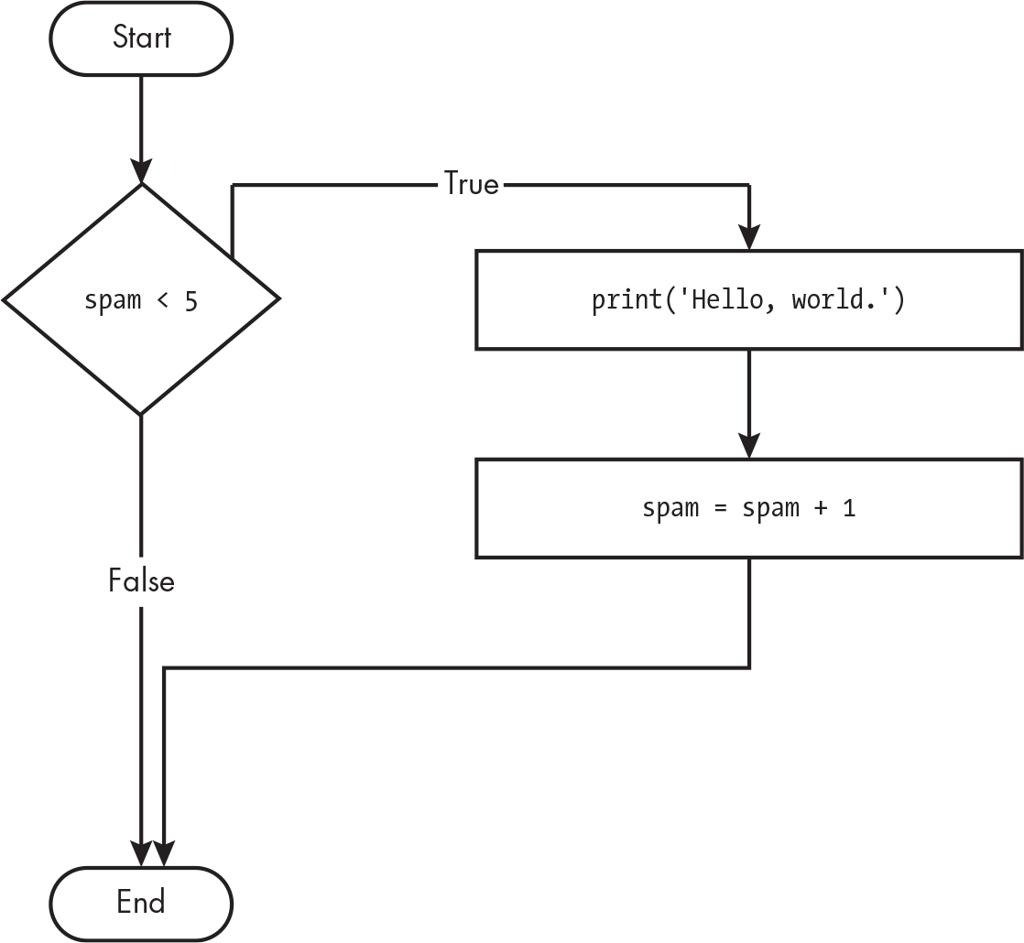
Python uses indentation to define blocks:
if True:
print(“Correct”)
Wrong indentation will cause errors—this is very important.
🔁 Loops in Python
Loops are used to repeat a block of code multiple times.
🔄 For Loop
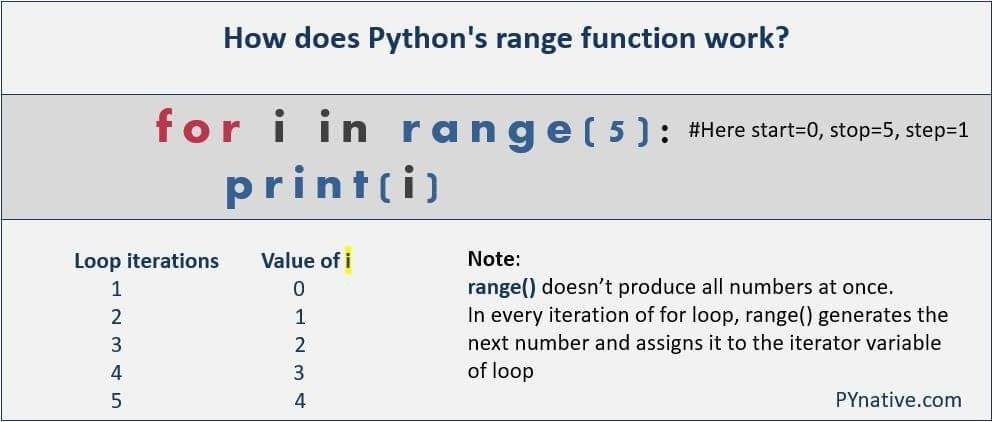
A for loop is used when you know how many times you want to repeat something.
for i in range(5):
print(i)
Output:
0 1 2 3 4
🔹 Loop Through List
fruits = [“apple”, “banana”, “mango”]
for fruit in fruits:
print(fruit)
🔄 While Loop
A while loop runs as long as a condition is true.
i = 0
while i < 5:
print(i)
i += 1
⚠️ Infinite Loop Warning
while True:
print(“Hello”)
👉 This will run forever unless stopped manually.
🛑 Break and Continue
These keywords control loops further.
Break → stops loop
for i in range(5):
if i == 3:
break
print(i)
Continue → skips iteration
for i in range(5):
if i == 3:
continue
print(i)
🔍 Real-Life Example
numbers = [1, 2, 3, 4, 5]
for num in numbers:
if num % 2 == 0:
print(num, “is even”)
else:
print(num, “is odd”)
👉 This combines:
- Loop
- Condition
- Operator
⚠️ Common Mistakes Beginners Make
- Forgetting indentation
- Writing wrong conditions
- Creating infinite loops accidentally
- Confusing = with ==
📊 Graph: Control Flow Efficiency
y=3xy = 3xy=3x
Explanation:
This graph shows that as your understanding (x) of control structures improves, your programming efficiency (y) increases rapidly. Control structures are key to writing powerful logic.
🚀 Why Control Structures Matter in AI/ML
In AI and Machine Learning:
- Loops process large datasets
- Conditions help models make decisions
- Iterations improve accuracy (training models)
Without control structures, programs would be static and unable to handle real-world problems.
💡 Pro Tips for Beginners
- Practice writing small programs using loops
- Combine loops with conditions
- Avoid deep nesting (too many if statements)
- Test your code step by step